Xóa tài khoản
Tại Koki Software, chúng tôi tôn trọng quyền riêng tư và quyền kiểm soát dữ liệu cá nhân của bạn. Koki Flashcard cung cấp cho bạn phương thức để yêu cầu xóa tài khoản ngay trong ứng dụng một cách đơn giản và nhanh chóng.
Bạn có thể truy cập vào tài khoản của mình và yêu cầu xóa tài khoản bất kỳ lúc nào. Quy trình xóa tài khoản được thiết kế để đảm bảo rằng bạn hoàn toàn chủ động trong việc quản lý thông tin cá nhân của mình, phù hợp với các quy định bảo vệ dữ liệu quốc tế bao gồm GDPR.
Hướng dẫn xóa tài khoản
Để xóa tài khoản Koki Flashcard của bạn, vui lòng thực hiện theo 3 bước đơn giản dưới đây. Toàn bộ quy trình chỉ mất khoảng 1 phút.
Bước 1: Đăng nhập vào tài khoản bạn muốn xóa.
Mở ứng dụng Koki Flashcard trên thiết bị di động của bạn (iOS hoặc Android). Đăng nhập bằng email hoặc tài khoản mạng xã hội mà bạn đã sử dụng để đăng ký. Hãy đảm bảo rằng bạn đang đăng nhập đúng tài khoản mà bạn muốn xóa.
Bước 2: Chọn Hồ sơ, sau đó chọn Xóa tài khoản.
Sau khi đăng nhập thành công, nhấn vào biểu tượng Hồ sơ (Profile) ở góc dưới bên phải của màn hình. Cuộn xuống cuối trang hồ sơ, bạn sẽ thấy tùy chọn "Xóa tài khoản" (Delete Account). Nhấn vào tùy chọn này để tiếp tục.
Bước 3: Xác nhận xóa tài khoản.
Hệ thống sẽ hiển thị một hộp thoại xác nhận để đảm bảo rằng bạn thực sự muốn xóa tài khoản. Đọc kỹ thông tin cảnh báo và nhấn "Xác nhận" để hoàn tất việc xóa tài khoản. Sau khi xác nhận, tài khoản và toàn bộ dữ liệu liên quan sẽ được xóa vĩnh viễn.
Hình ảnh minh họa
Dưới đây là các hình ảnh minh họa cho từng bước trong quy trình xóa tài khoản trên ứng dụng Koki Flashcard:
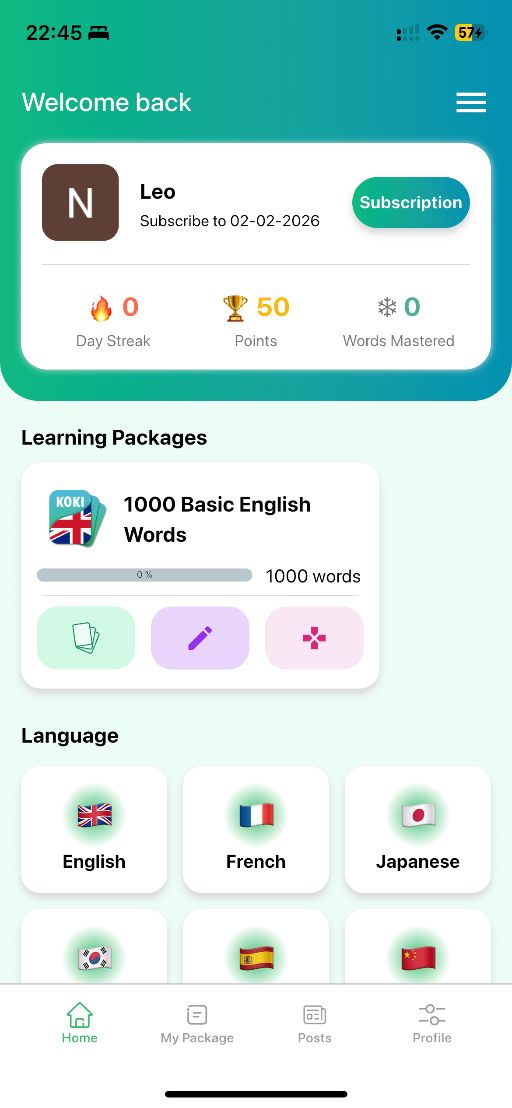
Bước 1: Đăng nhập vào tài khoản
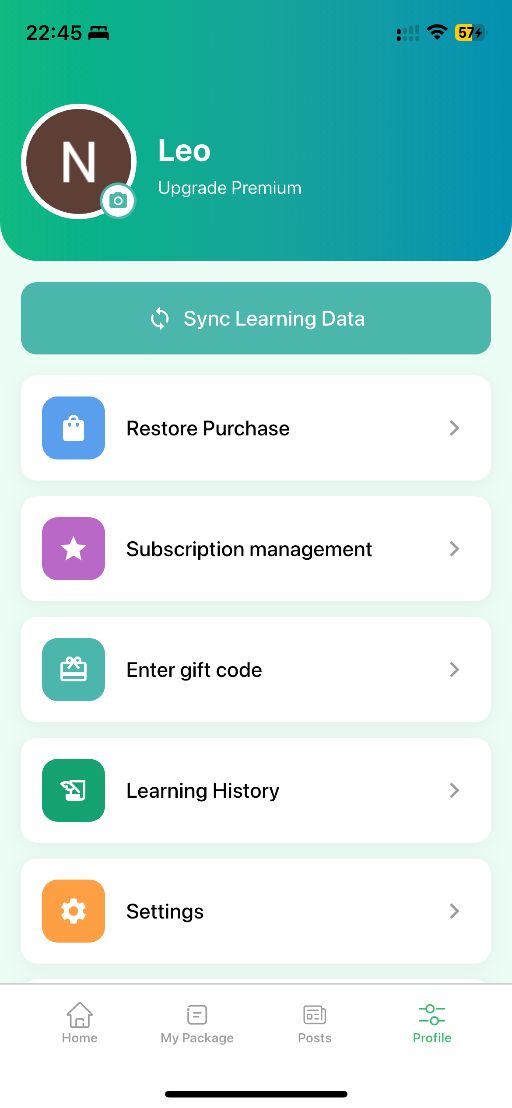
Bước 2: Chọn Hồ sơ và nhấn Xóa tài khoản
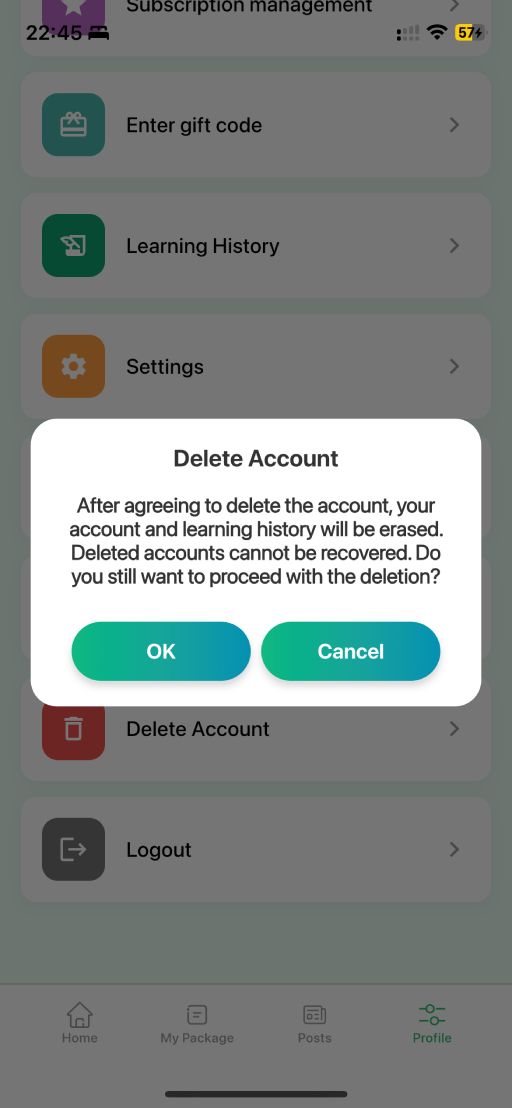
Bước 3: Xác nhận xóa tài khoản
Dữ liệu nào sẽ bị xóa?
Khi bạn yêu cầu xóa tài khoản, tất cả các dữ liệu liên kết với tài khoản của bạn sẽ được xóa khỏi hệ thống của chúng tôi. Cụ thể, các dữ liệu sau sẽ bị xóa vĩnh viễn:
- Thông tin tài khoản: tên, email, ảnh đại diện và thông tin đăng nhập của bạn.
- Lịch sử học tập: toàn bộ tiến trình học, thống kê, điểm số và thành tích đã đạt được.
- Bộ từ vựng tùy chỉnh: các bộ flashcard mà bạn đã tự tạo hoặc tùy chỉnh.
- Dữ liệu đồng bộ: tất cả dữ liệu đã được đồng bộ lên đám mây sẽ bị xóa hoàn toàn.
Thời gian xử lý
Việc xóa tài khoản và dữ liệu liên quan sẽ được thực hiện ngay lập tức sau khi bạn xác nhận yêu cầu. Trong một số trường hợp, dữ liệu sao lưu trên hệ thống có thể mất tối đa 30 ngày để được xóa hoàn toàn khỏi tất cả các máy chủ của chúng tôi.
Lưu ý quan trọng
Trước khi xóa tài khoản, vui lòng lưu ý những điều sau đây:
- Hành động này không thể hoàn tác. Sau khi xóa, tài khoản và toàn bộ dữ liệu của bạn sẽ không thể khôi phục được dưới bất kỳ hình thức nào.
- Nếu bạn đang sử dụng gói Premium, việc xóa tài khoản sẽ không tự động hủy đăng ký trên App Store hoặc Google Play. Vui lòng hủy đăng ký trước khi xóa tài khoản.
- Bạn sẽ không thể đăng nhập lại bằng cùng tài khoản sau khi đã xóa. Nếu muốn sử dụng lại dịch vụ, bạn sẽ cần tạo một tài khoản mới.
Thay thế cho việc xóa tài khoản
Nếu bạn chỉ muốn tạm ngừng sử dụng ứng dụng mà không mất dữ liệu, bạn có thể đơn giản đăng xuất khỏi tài khoản thay vì xóa. Dữ liệu của bạn sẽ được bảo lưu và bạn có thể đăng nhập lại bất kỳ lúc nào. Nếu bạn gặp vấn đề với ứng dụng, vui lòng liên hệ đội ngũ hỗ trợ của chúng tôi trước khi quyết định xóa tài khoản — chúng tôi luôn sẵn sàng giúp đỡ bạn.
Cần hỗ trợ?
Nếu bạn gặp khó khăn trong quá trình xóa tài khoản, không thể truy cập tài khoản của mình, hoặc có bất kỳ câu hỏi nào liên quan, vui lòng liên hệ với đội ngũ hỗ trợ của chúng tôi. Chúng tôi sẽ phản hồi trong vòng 24 giờ làm việc.
Email: support@anki.edu.vn
Website: https://anki.edu.vn
Cập nhật lần cuối: Tháng 2, 2026